Friday, 8 August 2014

Azure Mobile Services for ASP.NET Developers and Others Too


Overview
Mobile services is one of the wonderful thing i have seen on azure in 2014. These services are build on top of the existing Azure infrastructure and the service is hosted by a Web Role and data is stored on a SQL Database, they’re just simpler for the developer to create and to interact with.Windows Azure Mobile Services are designed to create highly-functional mobile applications with ease .

Explanation & Implementation
Windows Azure Mobile Services brings together a set of services that enable backend capabilities for your apps and allows you to make rapid app development possible from storage, authenticate users, to push notifications. With SDKs for Windows, Android, iOS, and HTML as well as a powerful and flexible REST API, Mobile Services lets you to build inter connected and deliver a consistent experience across devices.If you will observe below screen shot ,you will find that

Mobile Services Capabilities
 Mobile Services provides the following backend capabilities in Azure to support your apps:
  • Simple provisioning and management of tables for storing application data.
  • Integration with notification services to deliver push notifications to your application.
  • Integration with other cloud services.
  • Service monitoring and logging. 
  • Create a straightforward and secure backed-as-a-service to handle common tasks and get relieved from burden of focusing on the front end that users much bother about.  
  • Integration with Visual Studio. Your favorite IDE now contains a dedicated project template and scaffolders for Mobile Services, and has first-class support for publishing and remote debugging baked in.
Activating the feature
As discussed in my previous article Here that the first thing you’ll need is an Azure subscription:

Creating the service
Now that the feature is enabled, we can start using it from the new Azure Management portal: press the New button and choose Create in the Mobile Services section. In the first step of the wizard you’ll be asked to choose:

  • A name for the service (it will be the first part of the URL, followed by the domain azure-mobile.net (In my case it is, GetAllDevices.azure-mobile.net)

  • This Step is about database where we will be forced to select Create a new SQL database, unless you already have other SQL Azure instances.
  • The region where the service will be hosted: choose the closest region to your country
  • Just click on url or simply browse to URL. You will see below screen which clearly shows that service is up and brow-sable


Azure gives option to choose database while creating mobile services Make sure you fallow below steps:
  • The name of the database.
  • The server where to store the database (use the default option, that is New SQL Database server).
  • Credentials(UserName and password) of the user that will be used to access to the database.
  • The region where the database will be hosted:

This is all about mobile service and we ’re done!. Now service is up and running! If you go to the URL that you’ve chosen in the first step you’ll see a welcome page. This is the only “real” page you’ll see: we have created a service, specifically it’s a standard REST service. What Next ?

Next we’ll see how we will be able to do operations on the database simply by using standard HTTP requests.

Azure Mobile Services provides a great way for mobile developers to add a cloud-hosted backend to their app. The service now has full support for writing your back end logic using ASP.NET Web API. Mobile Services presents an attractive choice for developers building mobile facing APIs with ASP.NET:

 Once the service is created, Go to Quick-start tab and download the starter project for the client platform you wish to target.once downloaded you will find service started project solution ready here


NOTE: Below implementation requires Visual Studio 2013 Update 2 or above.
 
Alternatively, you can create a local project first and create the mobile service later when you want to publish your project.


Either way what you’ll get is a Mobile Services .NET template project. Notice this is simply a Web API project with few additional Nu Get packages used.


Open the TodoItemController.cs controller file and look into  its content. Better,just set a breakpoint inside the GetAllTodoitems() method  and watch how to work with data using Mobile Services .NET support:
Notice we already scaffold all the key CRUD methods for the TodoItem resource.
public class TodoItemController : TableController
{
    protected override void Initialize(HttpControllerContext controllerContext)
    {
        base.Initialize(controllerContext);
        csharp_testContext context = new csharp_testContext();
        DomainManager = new EntityDomainManager(context, Request, Services);
    }

    // GET tables/TodoItem
    public IQueryable GetAllTodoItems()
    {
        return Query();
    }

    // GET tables/TodoItem/48D68C86-6EA6-4C25-AA33-223FC9A27959
    public SingleResult GetTodoItem(string id)
    {
        return Lookup(id);
    }

    // PATCH tables/TodoItem/48D68C86-6EA6-4C25-AA33-223FC9A27959
    public Task PatchTodoItem(string id, Delta patch)
    {
        return UpdateAsync(id, patch);
    }

    // POST tables/TodoItem/48D68C86-6EA6-4C25-AA33-223FC9A27959
    public async Task PostTodoItem(TodoItem item)
    {
        TodoItem current = await InsertAsync(item);
        return CreatedAtRoute("Tables", new { id = current.Id }, current);
    }

    // DELETE tables/TodoItem/48D68C86-6EA6-4C25-AA33-223FC9A27959
    public Task DeleteTodoItem(string id)
    {
        return DeleteAsync(id);
    }
}

Just replace above controller name with DeviceController.CS  and code with operations you want to ... here is what i am doing.. 

public class DeviceController : TableController
{
    protected override void Initialize(HttpControllerContext controllerContext)
    {
        base.Initialize(controllerContext);
        csharp_testContext context = new csharp_testContext();
        DomainManager = new EntityDomainManager(context, Request, Services);
    }

    // GET tables/Device
    public IQueryable GetAllDevices()
    {
        return Query();
    }

    // GET tables/Device/48D68C86-6EA6-4C25-AA33-223FC9A27959
    public SingleResult GetDevice(string id)
    {
        return Lookup(id);
    }

    // PATCH tables/Device/48D68C86-6EA6-4C25-AA33-223FC9A27959
    public Task PatchDevice(string id, Delta patch)
    {
        return UpdateAsync(id, patch);
    }

    // POST tables/Device/48D68C86-6EA6-4C25-AA33-223FC9A27959
    public async Task PostDeviceTodoItem item)
    {
        TodoItem current = await InsertAsync(item);
        return CreatedAtRoute("Tables", new { id = current.Id }, current);
    }

    // DELETE tables/Device/48D68C86-6EA6-4C25-AA33-223FC9A27959
    public Task DeleteDevice(string id)
    {
        return DeleteAsync(id);
    }
}
Notice we already scaffold all the key CRUD methods for the TodoItem resource.

With Mobile Services .NET support you can run Mobile Services backend locally and debug your backend logic. Hit F5, on the default page choose “try it out”. Mobile Services .NET support comes with a help page for your Web API, as you would expect. Click on the GET tables/TodoItem for me GetAllDevices to bring up method documentation, as well as the test client. Click on the “try this out” link and then press “send” to invoke the GetAllDevices() method. As you expect, you will hit the breakpoint you’ve set up earlier.


Once you are done developing your backend API, you can publish your Web API to the Mobile Service. Publishing support is built right into Visual Studio, simply right-click the project and select “Publish”. You can pick an existing mobile service or create a new one right from within Visual Studio, without having to go the Azure portal.

Conclusion:Writing mobile service has become fun a.The service now has full support for writing your back end logic using ASP.NET Web API. Mobile Services presents an attractive choice for developers building mobile facing APIs with ASP.NET especially integration with enterprise level application.


Monday, 4 August 2014

Free Tools for C# reverse engineering

Reverse engineering or decompiling an application can be done easily for .net java applications and is very straight forward but for languages like C++ or C, it's not a straightforward process. The managed code (.NET and Java) world provides a much easier approach, as all source code is compiled into Microsoft Intermediate Language (MSIL). The MSIL is converted to machine code by a just-in-time (JIT) compiler when it is executed.
I worked with lots of reverse engineering tools including reflector but i found JustCompile the best which has large number of features and great user interface.I've used Red gate reflector also but it's no longer free

Free Tool


ILSpy
ILSpy is the open-source .NET assembly browser and decompiler.
Development started after Red Gate announced that the free version of .NET Reflector would cease to exist by end of February 2011.
ILSpy requires the .NET Framework 4.0.


Free .NET Decompiler and Assembly Browser

dotPeek is a free-of-charge .NET decompiler from JetBrains, the makers of ReSharper and more developer productivity tools.


Features?

  1. Decompiling .NET 1.0-4.5 assemblies to C#
  2. Exporting decompiled code to Visual Studio projects
  3. Support for downloading code from source servers and PDB files generation
  4. Quick jump to a type, assembly, symbol, or type member
  5. Effortless navigation to symbol declarations,
    implementations, derived and base symbols, and more
  6. Accurate search for symbol usages
    with advanced presentation of search results
  7. Overview of inheritance chains
  8. Syntax highlighting
  9. Complete keyboard support
  10. dotPeek is free!
FEATURES
Fastest Decompiler
10 times faster than competitors.
Extensible
Extensible
Open API for everyone to create extensions.
[C#5-(WinRT),-APPX]
Easy Assembly Management
Supports .NET 2, 3.5, 4, 4.5, 4.5.1, WinRT Metadata, C#5, APPX and WinMD.
Fast-code-navigation
Fast Code Navigation
Code becomes easily searchable with JustDecompile.
Creates-Visual
Creates Visual Studio Projects
Create a Visual Studio project from a decompiled assembly.
1-Engine-3-Tools
One Engine, Three Tools
JustDecompile integrates with JustCode and JustTrace.
View-Decompiled
View Decompiled Code in Tabs
Switch easily between different methods and assemblies in one JustDecompile instance.
VS-extension
Visual Studio Extension
Decompile referenced assemblies in a Visual Studio project.
Extract-resources
Extract Resources From Assemblies
Save resources from assemblies.
Usage-analysis
Usage Analysis
Bookmark usages in loaded assemblies.
[Style-Reports-to-Your-Needs]
Command Line Support
Export code directly from the command prompt.
[Easy-Assembly]
Integrate With Windows Explorer Context Menu
Here are three more available options, all of which are free:

Dotnet IL Editor (DILE) lets you disassemble and debug .NET code.
dotPeek :dotPeek is a free-of-charge .NET decompiler from JetBrains, the makers of ReSharper and more developer productivity tools.


FEATURES
 Decompiling .NET 1.0-4.5 assemblies to C#
Exporting decompiled code to Visual Studio projects
Support for downloading code from source servers and PDB files generation
Quick jump to a type, assembly, symbol, or type member
Effortless navigation to symbol declarations,
implementations, derived and base symbols, and more
Accurate search for symbol usages
with advanced presentation of search results
Overview of inheritance chains
http://community.sharpdevelop.net/photos/christophwille/images/34590/original.aspxSyntax highlighting
Complete keyboard support
  • ILSpy is an open source assembly browser and decompiler.
ILSpy Features

Assembly browsing
IL Disassembly
Support C# 5.0 "async"
Decompilation to C#
Supports lambdas and 'yield return'
Shows XML documentation
Decompilation to VB
Saving of resources
Save decompiled assembly as .csproj
Search for types/methods/properties (substring)
Hyperlink-based type/method/property navigation
Base/Derived types navigation
Navigation history
BAML to XAML decompiler
Save Assembly as C# Project
Find usage of field/method
Extensible via plugins (MEF)
Assembly Lists

MSIL Disassembler: The MSIL Disassembler is a companion tool to the MSIL Assembler (Ilasm.exe). Ildasm.exe takes a portable executable (PE) file that contains Microsoft intermediate language (MSIL) code and creates a text file suitable as input to Ilasm.exe.
ILSpy
: ILSpy is the open-source .NET assembly browser and decompiler from the SharpDevelop team.
.NET Reflector: NET Reflector is a commercial assembly browser for the Microsoft .NET platform that can be used to explore, analyze, decompile, and debug the contents of any .NET assembly. Used to be free.
Dotnet IL Editor (a disassembler): Dotnet IL Editor (DILE) allows disassembling and debugging .NET 1.0/1.1/2.0/3.0/3.5 applications without source code or .pdb files. It can debug even itself or the assemblies of the .NET Framework on IL level.
IL.View – IL.View is an open-source Silverlight .NET assembly browser and decompiler.
 Common Compiler Infrastructure (CCI): CCI consists of two components, CCI Metadata and CCI Code, which represent a .NET portable executable (PE) or debug file as an object model. Applications can then use the object model to analyze or modify the contents of the file.
Mono Cecil: Cecil is a library written by Jb Evain to generate and inspect programs and libraries in the ECMA CIL format. It has full support for generics, and support some debugging symbol forma
 Assembly Analyzer: Assembly Analyzer is a tool for analyzing the metadata and resources within a .NET assembly, as well as disassembling non-CLI executable files.  The tool allows you to view dependencies of assemblies and members.  It uses the Mirror library (source included) for loading assembly metadata and other Portable Executable-format files.
Salamander: Salamander is a commercial .NET decompiler that converts executable files (.EXE or .DLL) from Intermediate Language (IL, MSIL, CIL) binary format to high-level source codes, such as C#, managed C++, Visual Basic.NET, etc. For more than 8,000 classes that have been tested, Salamander always produces equivalent and recompilable codes that are remarkably close to the original source codes Dis#: commercial. Dis# (DisSharp) is a powerful tool to reverse engineer MSIL code into a human readable one.
Spices.NET Decompiler: Spices.Net Decompiler is a commercial tool that offers a productivity package for .NET software developers that is exceptional in the industry for ease of use and top of the range performance.
Decompiler.NET: Decompiler.NET is a commercially available combination of Decompiler, Obfuscator, Language Translator, and Refactoring Tool for Microsoft .NET managed applications.

Sunday, 3 August 2014

Ultimate Free Css Html Tools for Web Designer and Web Developer


Useful CSS Tools for Developers


CSS tools are important for web developers,designer because they help a lot while working with web designing. Looking for right tool is also time consuming sometimes.I have collected list of tools which will be helpful . Here is the collection of  useful CSS tools and generators that every developer should know about.

CSS Colors Tools

CSS Developer Tool –  CSS Modal

This tools built with pure CSS, just click on that link and make your page with CSS modal. Using web design methods and can fit one all screen of mobile and PC.


Color Scheme Designer
This tool provides colors in the form of a color wheel that offers mono, complement, analogic and accented analogic color variations in the percentage ratio; and it also highlights the same with the suitable scheme chosen.

Developer Tool - Jiko

Jiko, is a template engine for JavaScript programmers, provides a unique and modern interface o write templates with an engine as powerful as server side.


Ultimate CSS Gradient Generator
It is a CSS gradient editor and generator that lets you create CSS gradients having cross-browser support.
CSS Color Codes
This tool offers two options for furnishing the hexadecimal and RGB color codes. You can pick the color from the color picker and then copy its hexadecimal value from the bottom field.
Screenshot
Colors Pallete Generator
This is a powerful tool that generates a color palette derived from the primary colors of the image that you upload. It is a useful tool for rapidly grabbing a particular color within an image for inspiration. With this, you can also generate Photoshop swatches and CSS styles.

CSS Colors
This color chart offers more than 16 million colors with both RGB and hexadecimal color modes.
Screenshot
Gradient Image Maker
This tool allows you to easily generate a gradient image of 3 types with on the spot previewing. With this tool you can create gradient images that you can use everywhere in your web page design.
Screenshot


HTML TABLE GENERATOR


CSS Layouts Tools

templatr
It is a template generator that lets you create beautiful templates for your blog and web design without requiring any HTML and CSS knowledge.

Free CSS Template Code Generator
It is a free HTML – CSS template generator that generates a three column layout without using any Tables. This template generator produces a custom-made template that can be used to control the look and feel of an entire website.
Screenshot


Firdamatic: the Design Tool for the Uninspired Webloggers
This table less layout generator lets you easily create and customize layouts by simply completing a form.

CSS Layout Generator – CSS Portal
Another layout generator with which you can create a fluid or fixed width column layout, with up to 3 columns, header, footer and menu.
Screenshot
CSS Layout Generator
Another CSS Layout Generator that allows you to create your own template by using HTML and CSS. You can create a template with up to 3 columns and a header and footer.

Layout Generator
This tool generates multi-column and grid layouts with CSS 2.0 techniques by using pixels, percentage or em.
Screenshot
CSS Layout Generator
With this tool, you can modify the header, footer, sidebars and layout width and can set the document type as XHTML or HTML strict or transitional to see the preview in the same page.
Screenshot
YAML Builder
This tool is designed for visual development of YAML based CSS layouts.

CSS Grids Tools

The 1KB CSS Grid
It is a lightweight tool with which you can streamline page templates for content management systems.
Screenshot
Variable Grid System
It is a quick way to generate an underlying CSS grid that is based on the 960 Grid System.


GRIDINATOR
This tool allows you to generate grids for the 960.gs, Golden Grid, or 1KB Grid. You can even generate a basic generic grid.
Screenshot
Blueprint Grid CSS Generator
With this tool, you can generate more flexible versions of Blueprint’s grid.cs and compressed.css and grid.png files.
Screenshot
CSS Grid Calculator
This calculator allows you to envision page layouts and draw grids in a variety of ways. You can have an accurate visual feedback on how text blocks and page divisions will appear within a browser window. You can also return style declarations for divisions and text to copy and paste into style sheets.
Screenshot


Grid Designer
This tool allows you create design grids by giving you options to customize Columns, Pixels, Gutters and Margins.
Screenshot
Em Calculator
Em Calculator is a JavaScript tool that lets you design scalable and accessible CSS design. This tool converts pixels to their relative em units based on a text size.

CSS Menus and Buttons

CSS Menu Maker
This tool allows you create custom, cross browser compatible website menus.


CSS Menu Generator
This menu generator lets you generate CSS and HTML codes which you need to create an appealing set of text based navigation buttons.

My CSS Menu
This tool provides an easy way to create cross browser compatible CSS menus. With this tool, you can create Horizontal, Vertical, Drop-down web navigation.

Tabs Generator
Another CSS navigation Tab Menu generator that allows you tweak size, colors, corners and more to generate unique designs that can be downloaded for your use.


CSS Button & Text Field Generator
This tool is a CSS button and text field generator that lets you easily create with just a click of the mouse.
Screenshot

Fonts and Text CSS Tools

CSS font style
You can use this tool to set the style of the font to italic or oblique.
Screenshot
Typetester
This application provides a comparison of the fonts for the screen. Since the new fonts are packed into operating systems, the list of the common fonts will be updated.

CSS Font and Text Style Wizard
You can use this wizard if you want to experiment with the fonts and text styles in order to generate sample CSS style source code. Dynamic HTML is used in this wizard that changes the style of the table , without loading another page.
CSS Type Set
This is a typography tool that allows designers and developers to test and learn the ways to style their web content.

CSS Generator & Optimizer

CSS Generator
This tool lets you choose a style for your web page. You can select different Cascading Style Sheet properties with live preview. You can choose color, HTML tag, click the field you would like to insert color into and color them.
CSS Generator
This tool gives you a live preview of the color that you select from the palette. You can directly specify colors and other design attributes. This tool helps you select a face color for your new web project straight away!

Cascading Style Sheet CSS Generator
This is a free tool that lets you create cascading style sheets for your web page. You can add as many style sheets as you want.

quickCSS – Online-CSS-Generator
With this tool, you can generate CSS with just one click.

Spiffy Corners – Purely CSS Rounded Corners
It is a simple tool to generate the CSS and HTML required to generate anti-aliased corners without using images or JavaScript.

Clean CSS
This is a CSS optimizer and formatter that takes your CSS code and makes it cleaner and more concise.
Screenshot
Simple CSS
This tool lets you create unique Cascading Style Sheets from scratch. You can also modify your existing CSS.
Screenshot
Regex Patterns for Single Line CSS
While formatting your CSS Style sheet single-line, you may find Dan Rubin’s Textmate macro useful if you group your ruler and add white spaces that makes scanning through the web page easier. You can also use a regular expression if you don’t want to use Textmate.
Screenshot

CSS Sprite Tools

CSS – Sprit.es
With this tool, you can easily generate CSS and HTML code by uploading the file you want to use in your CSS sprite and then click the button that join all your images into a single file. With this tool, you can also achieve any rollover effects.

Spritegen CSS Sprites
This tool allows you create your sprite by letting your upload your image and then add more images. You can also set the output of your images as in PNG, JPEG or GIF.

CSS Sprites
With this tool, upload any number of images and click Generate button to create your CSS sprites with ease.

Website Performance (CSS Sprite Generator)
It is a tool that allows you to upload your source file in order to create the sprite image and CSS. This tool works by ignoring duplicates, resizing the source images, setting the sprite and other CSS options like horizontal and vertical offset, background color, class prefix, CSS suffix etc.
Screenshot
Spritebox
It is a WYSIWYG tool that is helpful for the web designers who want to quickly create CSS classes and IDs from a single sprite image. This tool works on the principle of using the background-position property to line up areas of a sprite image into block elements of a web page.

Other CSS Tools

MinifyMe
It is a small AIR application that packs together multiple CSS and JavaScript files into one and runs on your desktop.

Password Generator
This tool generates all the compulsory codes required to password protect a directory, or selects files within it on your site by means of .htaccess. This tool works by encrypting your desired password and then put the outputs inside your .htaccess and .htpasswd files.

XHTML/CSS Markup Generator
This is a simple tool that lets you quickly generate XHTML Markup and a CSS frame; shorten syntax so that you can directly jump to the elements styling. This tool significantly speeds up your work.

 SlickMap CSS

This tool displays your site maps directly from HTML unordered list navigation. This is appropriate for the websites that want to accommodate up to three levels of page navigation and extra utility links that can be easily modified to meet personal requirements, branding, or style preferences.

CSS3 Please!
This tool displays the output of your code instantaneously. It is a simple yet powerful tool for the web designers and developers.

CSS Sorter
CSS Sorter is a tool that sorts CSS files and rules alphabetically so that you can easily manage your CSS files.

Sky CSS Tool
Sky CSS lets you create CSS classes without requiring any manuscript code. In order to work properly, it needs a JavaScript compatible browser.

CSS Table Wizard
This wizard helps you generate style source code and allows you to do experiments with table border styles.

Csstxt
Csstxt is a powerful tool that illustrates numerous ways to add a style to a text with ‘a’, ‘p’ or div tag.

Procssor cleans and organizes your css the way you want it.Perfect for css consistency when multiple people contribute.


Less Framework :

 Less Framework is a CSS grid system for designing adaptive web­sites. It contains 4 layouts and 3 sets of typography presets, all based on a single grid


960 Grid

For those more comfortable designing on a 24-column grid, an alternative version is also included. It consists of columns 30 pixels wide, with 10 pixel gutters, and a 5 pixel buffer on each side of the container. This keeps text from touching browser chrome — helpful for devices like the iPhone, where a lower-case "i" or "l" might be easily missed. View demo.  

Hope this helps....

How to Build a Full-Stack Web App with Blazor

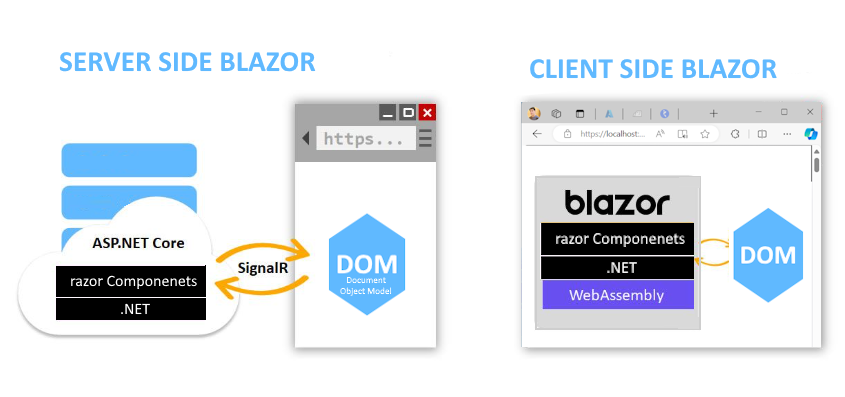
  Blazor Stack Overview Important Points: Blazor stack gives you options to create Web Applications without writing JavaScript (doesn't ...