Saturday, 11 April 2015

CSS3 Explained with live example ? Why it is required?


SEE LIVE Example

What are CSS3 Animations?

The CSS animation feature was introduced into Webkit in 2007. In 2009 a working draft was written and added to the w3c site.
To use CSS animation, the most important and key concept is key-frames.you first specify some keyframes for the animation - basically what styles will the element have at certain times. The browser does the rest for you.
Animation is the process of creating motion and shape change or in real , illusion by means of the rapid display of a sequence of static images that minimally differ from each other. An animation lets an element gradually change from one style to another.
If you want to achieve such motion or movement of elements on web  using css3 (rather than depending on tools like flash,silverlight..) you can define it as CSS3 animation  You can change as many CSS properties you want, as many times you want.To use CSS3 animation, you must first specify some keyframes for the animation.Keyframes hold what styles the element will have at certain times .

Why CSS3 includes animation?

People who have experienced or worked with web they will definitely realize that animation was possible only by using heavy tools like flash ,silverlight..which was more about moving web experiences/website designing to software development components… In other words, we were using above mentioned tools for creating animation components which was heavy ,dependent and cumbersome experience.I don't disagree that Flash, Silver-light, AJAX, CSS – are all merely tools and all of them powerful in their own way – all of them appropriate for certain application.
It is really great and very exciting that CSS3 styling language has support for Animation – Agree,we still have to wait bit to see how the standard is implemented across all browsers
Finally leaving all religious favor-ism to tools  ,we have to agree css3 with animation is big change in web experience and will give boost to web experience

CSS3 ADVANTAGES:


There are mainly three key advantages over traditional Flash/silverlight and JS script-driven animation techniques:
  1. CSS3 Animation is declarative and easy to use for simple animations; you can create them without even having to know JavaScript.
  2. The animations run well because rendering engine can use frame-skipping and other techniques to keep the performance as smooth as possible.
  3. Giving power to browser for control the animation sequence which is surely optimized and efficient, for example, reducing the update frequency of animations running in tabs that aren't currently visible.


The Building Blocks of Animations

CSS animations are made up of two basic building blocks.
  1. Keyframes - define the stages and styles of the animation.
  2. Animation Properties - assign the @keyframes to a specific CSS element and define how it is animated.

1 )@keyframes

When you specify CSS styles inside the @keyframes rule, the animation will gradually change from the current style to the new style at certain times.To make an animation work on webpage, we must bind bind the animation to respective element like div,span,image...
Let us take simple example to understand css3 animation
The following example binds the "example" animation to the <div> element. The animation will lasts for 4 seconds, and it will gradually reduce the width   of the <div> element from 100px to 10px:

SEE LIVE Example


After change animation-count property to infinite


<!DOCTYPE html>
<html>
<head>
<style>
div {
width: 400px;
height: 100px;
background-color: red;
-webkit-animation-name: example; /* Chrome, Safari, Opera */
-webkit-animation-duration: 4s; /* Chrome, Safari, Opera */
animation-name: example;
animation-duration: 4s;
}

/* Chrome, Safari, Opera */
@-webkit-keyframes example {
from {width: 400px;}
to {width: 10px;}
}

/* Standard syntax */
@keyframes example {
from {width: 400px;}
to {width: 10px;}
}
</style>
</head>
<body>


<div></div>

<p><b>See:</b> When an animation is over, it will return its  original style.</p>

</body>
</html>
In the example above we have specified when the style will change by using the keywords "from" and "to" (which represents 0% (start) and 100% (complete)).


2: Animation Properties

Once the @keyframes are defined, the animation properties must be added in order for your animation to function.
Animation properties do two things:
  1. They assign the @keyframes to the elements that you want to animate.
  2. They define how it is animated.
The animation properties are added to the CSS selectors (or elements) that you want to animate. You must add the following two animation properties for the animation to take effect:
  • animation-name: The name of the animation, defined in the @keyframes.
  • animation-duration: The duration of the animation, in seconds (e.g., 5s) or milliseconds (e.g., 200ms).

Delay an Animation

The animation-delay property specifies a delay for the start of an animation.The following example has a 3 seconds delay before starting the animation:
Example
div {
    width: 400px;
    height: 100px;
    background-color: red;
    position: relative;
    animation-name: example;
    animation-duration: 4s;
    animation-delay: 3s;
}

Set How Many Times an Animation Should Run

The animation-iteration-count property specifies the number of times an animation should run.
The following example will run the animation 5 times before it stops:
Example
div {
   width: 400px;
    height: 100px;
    background-color: red;
    position: relative;
    animation-name: example;
    animation-duration: 4s;
    animation-iteration-count: 5;
}

The following example uses the value "infinite" to make the animation continue for ever:
Example
div {
   width: 400px;
    height: 100px;
    background-color: red;
    position: relative;
    animation-name: example;
    animation-duration: 4s;
    animation-iteration-count: infinite;
}

Run Animation in Reverse Direction or Alternate Cycles

The animation-direction property is used to let an animation run in reverse direction or alternate cycles.
The following example will run the animation in reverse direction:
Example
div {
    width: 400px;
    height: 100px;
    background-color: red;
    position: relative;
    animation-name: example;
    animation-duration: 4s;
    animation-iteration-count: 3;
    animation-direction: reverse;
}

The following example uses the value "alternate" to make the animation first run forward, then backward, then forward:
Example
div {
    width: 400px;
    height: 100px;
    background-color: red;
    position: relative;
    animation-name: example;
    animation-duration: 4s;
    animation-iteration-count: 3;
    animation-direction: alternate;
}

Specify the Speed Curve of the Animation

The animation-timing-function property specifies the speed curve of the animation.
The animation-timing-function property can have the following values:
  • ease - specifies an animation with a slow start, then fast, then end slowly (this is default)
  • linear - specifies an animation with the same speed from start to end
  • ease-in - specifies an animation with a slow start
  • ease-out - specifies an animation with a slow end
  • ease-in-out - specifies an animation with a slow start and end
  • cubic-bezier(n,n,n,n) - lets you define your own values in a cubic-bezier function
The following example shows the some of the different speed curves that can be used:
Example
#div1 {animation-timing-function: linear;}
#div2 {animation-timing-function: ease;}
#div3 {animation-timing-function: ease-in;}
#div4 {animation-timing-function: ease-out;}
#div5 {animation-timing-function: ease-in-out;}

How to use CSS3 animation


All in one example


The animations presented below involve setting up a transformation to take place in response to a mouseover or other event. Then, rather than applying the effect instantly, we assign a transition timing function which causes the transformation to take place incrementally over a set time period.

This is all illusion what we are creating with below sprite image with all possible steps of human while walking. you can choose horse,tiger .. any sprite image and find same animation.In reality we are showing one image at once with small small delay,which make feeling like an object is walking.
Let's get the  use for step easing out of the way: sprite animation.  The implementation is simple: jump the position of a background-image (which has all the frames of an animation laid out side-by-side) so that we see one "frame" at a time:


Steps()

The steps() function controls exactly how many keyframes will render in the animation time-frame.

Complete Stunning Example


<html>
<head> 
<title>Hello this is test</title>
<style>
    .runninggirl {
        margin-left: 400px;
        width: 68px;
        height: 100px;
        background-image: url("http://www.shabirhakim.net/img/ladyrun.png");
        -webkit-animation: play .8s steps(5) infinite;
        -moz-animation: play .8s steps(5) infinite;
        -ms-animation: play .8s steps(5) infinite;
        -o-animation: play .8s steps(5) infinite;
        animation: play .8s steps(5) infinite;
    }

    @-webkit-keyframes play {
        from {
            background-position: 0px;
        }

        to {
            background-position: -500px;
        }
    }

    @-moz-keyframes play {
        from {
            background-position: 0px;
        }

        to {
            background-position: -500px;
        }
    }

    @-ms-keyframes play {
        from {
            background-position: 0px;
        }

        to {
            background-position: -500px;
        }
    }

    @-o-keyframes play {
        from {
            background-position: 0px;
        }

        to {
            background-position: -500px;
        }
    }

    @keyframes play {
        from {
            background-position: 0px;
        }

        to {
            background-position: -500px;
        }
    }
</style>
</head>

<body>
<div class="runninggirl">
</div>
</body>
</html> 

SEE LIVE Example

 More Resources

Sunday, 21 December 2014

WMI Explained and How to use with .NET

WMI Explained and How to use with .NET

WMI is not new but as old as windows. WMI full form is Windows Management Instrumentation, which is basically an interface to the Windows OS system settings, drivers ,hardware.... .You can use wmi to intrograte windows system and servers along with network . WMI use scripting language like VnScript,JScript(not javaScript) to interact with windows.
Later microsoft integrated WMI namespace available in .NET. So, we  can use WMI with c#,vb.net(all language which work on .net)
A .NET developer can use WMI to obtain information about drivers installed on the client machine, verify whether the system is licensed or not, check for hardware information of each and every deveice and a lot more.
WMI is a very powerfull tool, and once you know how to get what you need, it can be invaluable as a time saver. When developing Windows applications, developers often need information a system, either local or remote, that although commonplace, can be very tough to get. There is using the remote registry, but I myself do not allow remote registry access as do many network admins. WMI is usually wide open on networks, assuming you have the required rights to query it .

WMI Architecture

The purpose of WMI is to present a uniform interface to any local or remote applications or scripts that need to access management data from a computer system, network or application. Thanks to WMI, programs do not have to talk to a wide variety of operating system APIs which can be particularly inconvenient for scripting languages.
All WMI interfaces are based on the Component Object Model (COM), however it is possible to access WMI from .NET thanks to the COM Inter-Op mechanism, as our diagram shows.


The main parts of WMI are as follows:
Managed objects and providers: A WMI provider is a COM object that monitors one or more managed objects for WMI. Like a driver, a provider extracts WMI data from a managed object and is responsible for passing messages from WMI back to the managed object.
WMI infrastructure: As a Windows component WMI consists of the Windows Management service, which includes the WMI Core, and the WMI repository. The service acts as an intermediary between the providers and the repository. Only static data about objects, such as the classes defined by the providers, are stored in the repository.
Management applications and scripts: A management application queries management information either by calling the COM API for WMI or through the Scripting API for WMI.
Assume you have to Query a database, you will choose SQL to query it likewise  we have WQL to Query a windows system
If you know the provider classes and the fields available, then you can get the info very easily.  For instance, if you wanted to get a list of logical drives from a system you would use the following query:
Select * from Win32_LogicalDisk
You can, however, refine the search by using where clauses and getting specific "fields" in the query. The following query gets the amount of freespace, the size, and the name of all fixed disk drives:
Select FreeSpace,Size,Name from Win32_LogicalDisk where DriveType=3
As you can see, constructing a simple WMI query is quite easy.  To get results, you need and interface, and in .Net it is provided by the System.Management namespace.  To make it work all you need is a query, and a little bit of code, just as if you were querying a database.
Note : while starting working with WMI make sure you set refrence to system.management.instrumentation. namespace

What Is WMI Provider?

WMI Provider is a software component that functions as a mediator between the CIM Object Manager and managed objects. By using the WMI APIs, providers supply the CIM Object Manager with data from managed objects, handle requests on behalf of management applications, and generate event notifications.

Microsoft WMI Code Creator

The Microsoft WMI Code Creator application  here. once downloaded and ran locally,you will see below screen
 
 “The WMI Code Creator tool allows you to generate VBScript, C#, and VB.NET code that uses WMI to complete a management task such as querying for management data, executing a method from a WMI class, or receiving event notifications using WMI.”.I you will see below ,it generates code as per your choice
 
 CONTINUE....
Further readings http://msdn.microsoft.com/en-us/library/ms257353%28v=vs.80%29.aspx

Sunday, 7 December 2014

Uploading and Importing CSV file to SQL Server using WebAPI


Uploading and Importing CSV file to SQL Server  using WebAPI

Assumption: Basic knowledge of MVC and WebApi
Download Source code:
Few weeks ago I was working with a WebAPI services . These services are consumed by multiple devices like IOS,Andriod....which involves uploading CSV file to Sql Server database and thought I'd share the simple implementation that I did on the project which i will believe will save somebodies time. In this post I will demonstrate how to create WebApi and upload and import CSV file to SQL Server database.

 Step 1: Create WebApi Service Application using your favourite IDE like shown below


Step 2:Modify Web.Config with sql connection details


Step 3: Modify UploadController with below class


public class UploadController : ApiController
    {
        [Route("api/Device/PostUpload")]
        [HttpPost]
        [ActionName("PostUpload")]
        public string PostUpload()
        {
            string individualExtractPath = null;
            StreamReader sr = null;
            try
            {
                HttpRequest request = HttpContext.Current.Request;
                //making file unique,you can use GUID also
                string fileName = request.Files[0].FileName + "_" + DateTime.Now.ToString("yyyy_MM_dd_HH_mm_ss");
                string DeviceId = request.Form["DeviceId"];
                //check for column key id
                if (DeviceId == null || "null".Equals(DeviceId.ToLower()))
                {
                   return "UnRegistered";

                }   
                string strFileExtractPath = HttpRuntime.AppDomainAppPath;
                strFileExtractPath = Path.Combine(strFileExtractPath, "UploadExtract");

                if (!Directory.Exists(strFileExtractPath))
                {
                    Directory.CreateDirectory(strFileExtractPath);
                }

                individualExtractPath = Path.Combine(strFileExtractPath, fileName);
                Directory.CreateDirectory(individualExtractPath);
                request.Files[0].SaveAs(individualExtractPath + "\\" + request.Files[0].FileName);
                string strUnzipedFilesLocation = Path.Combine(individualExtractPath, "unzipedFiles");
                Directory.CreateDirectory(strUnzipedFilesLocation);
                ZipFile.ExtractToDirectory(individualExtractPath + "\\" + request.Files[0].FileName, strUnzipedFilesLocation);
                ArrayList fileList = new ArrayList();
                // Get the files in the Directory
                string[] files = Directory.GetFiles(strUnzipedFilesLocation);

                int len = files.Length;

                for (int i = 0; i < len; i++)
                {
                    string filename = files[i];

                    // Add into the ArrayList
                    fileList.Add(System.IO.Path.GetFileName(filename));
                    FileInfo uploadFile = new FileInfo(filename);
                    sr = new StreamReader(filename);
                    DataTable oDataTable = null;
                    int RowCount = 0;
                    string[] ColumnNames = null;
                    string[] oStreamDataValues = null;
                    //using while loop read the stream data till end
                    while (!sr.EndOfStream)
                    {
                        String oStreamRowData = sr.ReadLine().Trim();
                        if (oStreamRowData.Length > 0)
                        {
                            oStreamDataValues = oStreamRowData.Split(',');
                            //Bcoz the first row contains column names, we will poluate 
                            //the column name by
                            //reading the first row and RowCount-0 will be true only once
                            if (RowCount == 0)
                            {
                                RowCount = 1;
                                ColumnNames = oStreamRowData.Split(',');
                                oDataTable = new DataTable();
                                //using foreach looping through all the column names
                                foreach (string csvcolumn in ColumnNames)
                                {
                                    DataColumn oDataColumn = new DataColumn(csvcolumn.ToUpper(), typeof(string));
                                    //setting the default value of empty.string to newly created column
                                    oDataColumn.DefaultValue = string.Empty;
                                    //adding the newly created column to the table
                                    oDataTable.Columns.Add(oDataColumn);
                                }
                            }
                            else
                            {
                                //creates a new DataRow with the same schema as of the oDataTable            
                                DataRow oDataRow = oDataTable.NewRow();
                                //using foreach looping through all the column names
                                for (int c = 0; c < ColumnNames.Length; c++)
                                {
                                    oDataRow[ColumnNames[c]] = oStreamDataValues[c] == null ? string.Empty : oStreamDataValues[c].ToString();
                                }
                                //adding the newly created row with data to the oDataTable       
                                oDataTable.Rows.Add(oDataRow);
                            }
                        }
                    }
                    //close the oStreamReader object
                    sr.Close();
                    //release all the resources used by the oStreamReader object
                    sr.Dispose();
                    //Creating two additinal columns dynamically because mobile trip file doesn't provide that

               
                    DataTable dtFinal = oDataTable;
                    //Class Bulk Insert here
                    BulkInsertTripFile(oDataTable);

                }

                return "File SuccessFully Posted";
            }
            finally
            {
                try
                {
                  
                    if (!string.IsNullOrEmpty(individualExtractPath) && Directory.Exists(individualExtractPath))
                    {
                        //If any such directory then creates the new one
                        DeleteDirectory(individualExtractPath);
                    }
                }
                catch (Exception ex)
                {
                    throw ex;
                }
            }
        }
        /// <summary>
        /// After uploading file ,just need
        /// </summary>
        /// <param name="target_dir"></param>
        private static void DeleteDirectory(string target_dir)
        {
            string[] files = Directory.GetFiles(target_dir);
            string[] dirs = Directory.GetDirectories(target_dir);

            foreach (string file in files)
            {
                File.SetAttributes(file, FileAttributes.Normal);
                File.Delete(file);
            }

            foreach (string dir in dirs)
            {
                DeleteDirectory(dir);
            }

            Directory.Delete(target_dir, false);
        }
        /// <summary>
        /// Method for Trip Detail bulk insert with datatable as parameter
        /// </summary>
        /// <param name="dt"></param>
        private void BulkInsertTripFile(DataTable dt)
        {

            string connString = System.Configuration.ConfigurationManager.AppSettings["BulkDemo"];

            // Copy the DataTable to SQL Server
            using (SqlConnection dbConnection = new SqlConnection(connString))
            {
                dbConnection.Open();
                using (SqlBulkCopy s = new SqlBulkCopy(dbConnection))
                {
                    s.DestinationTableName = "TripTable";
                    foreach (var column in dt.Columns)
                        s.ColumnMappings.Add(column.ToString(), column.ToString());
                    s.WriteToServer(dt);
                }
            }
        }
    }

step 4:Create view based on html page or you can create android or ios page for uploading/posting file
   
Hope this helps ... Shabir

Friday, 28 November 2014

C# Important Code Snippets and Utility Function


      public static bool isValidEmail(string email)
        {
            bool flag;
            string MatchEmailPattern = "^(([\\w-]+\\.)+[\\w-]+|([a-zA-Z]{1}|[\\w-]{2,}))@((([0-1]?[0-9]{1,2}|25[0-5]|2[0-4][0-9])\\.([0-1]?\r\n\t\t\t\t                [0-9]{1,2}|25[0-5]|2[0-4][0-9])\\.([0-1]?[0-9]{1,2}|25[0-5]|2[0-4][0-9])\\.([0-1]?\r\n\t\t\t\t                [0-9]{1,2}|25[0-5]|2[0-4][0-9])){1}|([a-zA-Z]+[\\w-]+\\.)+[a-zA-Z]{2,4})$";
            flag = (email == null ? false : Regex.IsMatch(email, MatchEmailPattern));
            return flag;
        }
        public static bool isValidURL(string url)
        {
            return Regex.IsMatch(url, "(http|https)://([\\w-]+\\.)+[\\w-]+(/[\\w- ./?%&=]*)?");
        }

       public static string[] LASTMONTH()
        {
            string[] dates = new string[2];
            DateTime dateTime = DateTime.UtcNow.AddHours(5.5);
            int year = dateTime.Year;
            dateTime = DateTime.UtcNow.AddHours(5.5);
            int month = dateTime.Month;
            DateTime lastDate = new DateTime(Convert.ToInt32(year), Convert.ToInt32(month), 1);
            lastDate = lastDate.AddDays(-1);
            if (month != 1)
            {
                month--;
            }
            DateTime firstDate = new DateTime(Convert.ToInt32(year), Convert.ToInt32(month), 1);
            dates[0] = PGUtil.FormatSQLDate(firstDate);
            dates[1] = PGUtil.FormatSQLDate(lastDate);
            return dates;
        }
 
      public static string[] LASTQTR()
        {
            string[] dates = new string[2];
            DateTime dateTime = DateTime.UtcNow.AddHours(5.5);
            int quarterNumber = (dateTime.Month - 1) / 3 + 1;
            if (quarterNumber != 1)
            {
                quarterNumber--;
            }
            dateTime = DateTime.UtcNow.AddHours(5.5);
            DateTime firstDate = new DateTime(dateTime.Year, (quarterNumber - 1) * 3 + 1, 1);
            dateTime = firstDate.AddMonths(3);
            DateTime lastDate = dateTime.AddDays(-1);
            dates[0] = PGUtil.FormatSQLDate(firstDate);
            dates[1] = PGUtil.FormatSQLDate(lastDate);
            return dates;
        }
  
      public static string[] LASTYEAR()
        {
            string[] dates = new string[2];
            int year = DateTime.UtcNow.AddHours(5.5).Year;
            year--;
            DateTime firstDate = new DateTime(Convert.ToInt32(year), 1, 1);
            DateTime lastDate = new DateTime(Convert.ToInt32(year), 12, 31);
            dates[0] = PGUtil.FormatSQLDate(firstDate);
            dates[1] = PGUtil.FormatSQLDate(lastDate);
            return dates;
        }
  
     public static bool SendEmail(string server, string AuthUser, string password, string subject, string from, string recipients, string body, string fileNames)
        {
            int i;
            bool status = true;
            try
            {
                MailMessage mail = new MailMessage();
                SmtpClient SmtpServer = new SmtpClient(server);
                mail.From = new MailAddress(from);
                char[] chrArray = new char[] { ',' };
                string[] strArrays = recipients.Split(chrArray);
                for (i = 0; i < (int)strArrays.Length; i++)
                {
                    string eachRecipient = strArrays[i];
                    if (!string.IsNullOrEmpty(eachRecipient))
                    {
                        mail.To.Add(eachRecipient);
                    }
                }
                mail.IsBodyHtml = true;
                mail.Subject = subject;
                body = HttpUtility.HtmlDecode(body);
                mail.Body = body;
                if (!string.IsNullOrEmpty(fileNames))
                {
                    Attachment attachment = null;
                    chrArray = new char[] { ',' };
                    strArrays = fileNames.Split(chrArray);
                    for (i = 0; i < (int)strArrays.Length; i++)
                    {
                        string eachAttachment = strArrays[i];
                        if ((string.IsNullOrEmpty(eachAttachment) ? false : File.Exists(eachAttachment)))
                        {
                            attachment = new Attachment(fileNames);
                            mail.Attachments.Add(attachment);
                        }
                    }
                }
                SmtpServer.Port = 25;
                SmtpServer.Credentials = new NetworkCredential(AuthUser, password);
                SmtpServer.EnableSsl = false;
                SmtpServer.Send(mail);
            }
            catch (Exception exception)
            {
                Exception e = exception;
                status = false;
                LogHandler.getInstance().Log(e);
            }
            return status;
        }
  
  public static string ArraytoString(object[] strArr)
        {
            string str;
            string str1;
            string returnString = string.Empty;
            if (strArr != null)
            {
                for (int i = 0; i < (int)strArr.Length; i++)
                {
                    if (strArr[i] == null)
                    {
                        str1 = null;
                    }
                    else
                    {
                        str1 = strArr[i].ToString();
                    }
                    if (!string.IsNullOrEmpty(str1))
                    {
                        returnString = string.Concat(returnString, strArr[i], (i < (int)strArr.Length - 1 ? "," : ""));
                    }
                }
                str = returnString;
            }
            else
            {
                str = null;
            }
            return str;
        }
  
  public static int getMonthsBetweenDates(DateTime startDate, DateTime endDate)
        {
            int count = 0;
            if (endDate > startDate)
            {
                int year = endDate.Year - startDate.Year;
                int month = endDate.Month - startDate.Month + 1;
                count = year * 12 + month;
            }
            return count;
        }
  
   public class PGUtil
    {
        private static WindowsImpersonationContext impersonationContext;

        public PGUtil()
        {
        }

        public static string[] AppendArrayElement(string[] array, object param)
        {
            string[] strArrays;
            if ((array == null ? false : param != null))
            {
                List list = array.ToList();
                list.Add(param.ToString());
                strArrays = list.ToArray();
            }
            else
            {
                strArrays = array;
            }
            return strArrays;
        }

        public static string ArraytoString(object[] strArr)
        {
            string str;
            string str1;
            string returnString = string.Empty;
            if (strArr != null)
            {
                for (int i = 0; i < (int)strArr.Length; i++)
                {
                    if (strArr[i] == null)
                    {
                        str1 = null;
                    }
                    else
                    {
                        str1 = strArr[i].ToString();
                    }
                    if (!string.IsNullOrEmpty(str1))
                    {
                        returnString = string.Concat(returnString, strArr[i], (i < (int)strArr.Length - 1 ? "," : ""));
                    }
                }
                str = returnString;
            }
            else
            {
                str = null;
            }
            return str;
        }


        [DllImport("kernel32.dll", CharSet = CharSet.Auto, ExactSpelling = false)]
        public static extern bool CloseHandle(IntPtr handle);

        public static DataSet CreateDummyScalarDataSet(string columnValue)
        {
            return PGUtil.CreateDummyScalarDataSet(null, columnValue);
        }

        public static DataSet CreateDummyScalarDataSet(string columnName, string columnValue)
        {
            DataSet ds = null;
            try
            {
                ds = new DataSet();
                DataTable tbl = new DataTable();
                tbl.Columns.Add("Id");
                tbl.Rows.Add(new object[] { columnValue });
                ds.Tables.Add(tbl);
            }
            catch (Exception exception)
            {
                LogHandler.getInstance().Log(exception);
            }
            return ds;
        }

        public static int dateComparison(DateTime date1, DateTime date2)
        {
            return DateTime.Compare(date1, date2);
        }


        public static string FormatCSVstring(string inputString)
        {
            string str;
            string outPutString = string.Empty;
            try
            {
                inputString = PGUtil.escapeSpecialChar(inputString);
                string[] arrData = inputString.Split(new char[] { ',' });
                for (int i = 0; i < (int)arrData.Length; i++)
                {
                    string tempString = string.Format("'{0}'", arrData[i]);
                    outPutString = (i != 0 ? string.Concat(outPutString, ",", tempString) : tempString);
                }
                str = outPutString;
            }
            catch
            {
                str = inputString;
            }
            return str;
        }

        public static string FormatOracleDate(DateTime date)
        {
            string str;
            try
            {
                str = date.ToString("dd-MMM-yyyy");
            }
            catch
            {
                str = date.ToString();
            }
            return str;
        }

        public static string FormatSQLDate(string date)
        {
            string str;
            string str1;
            try
            {
                if (!date.Equals("NULL"))
                {
                    if (date == null)
                    {
                        str1 = null;
                    }
                    else
                    {
                        str1 = PGUtil.ToDateTime(date).ToString("yyyy-MM-dd");
                    }
                    str = str1;
                }
                else
                {
                    str = null;
                }
            }
            catch
            {
                str = date.ToString();
            }
            return str;
        }

        public static string FormatSQLDate(DateTime date)
        {
            string str;
            try
            {
                str = date.ToString("yyyy-MM-dd");
            }
            catch
            {
                str = date.ToString();
            }
            return str;
        }

        public static string FormatString(string formatString, params string[] values)
        {
            string str;
            if (!string.IsNullOrEmpty(formatString))
            {
                if (values == null)
                {
                    throw new ArgumentNullException("values");
                }
                for (int index = 0; index < (int)values.Length; index++)
                {
                    formatString = formatString.Replace(string.Concat("{", index, "}"), values[index]);
                }
                str = formatString;
            }
            else
            {
                str = formatString;
            }
            return str;
        }

        public static DateTime GetCurrentIndiaDate()
        {
            return DateTime.UtcNow.AddHours(5.5);
        }

        public static TimeSpan GetCurrentIndiaTime()
        {
            return DateTime.UtcNow.AddHours(5.5).TimeOfDay;
        }

        public static object GetDataFromSession(string key)
        {
            object returnValue = null;
            try
            {
                returnValue = HttpContext.Current.Session[key];
            }
            catch (Exception exception)
            {
                LogHandler.getInstance().Log(exception);
            }
            return returnValue;
        }

        public static T GetDataFromSession(string key)
        {
            T item;
            T returnValue = default(T);
            try
            {
                if (HttpContext.Current.Session[key] is T)
                {
                    item = (T)HttpContext.Current.Session[key];
                    return item;
                }
            }
            catch (Exception exception)
            {
                LogHandler.getInstance().Log(exception);
            }
            item = returnValue;
            return item;
        }

        public static int getMonthsBetweenDates(DateTime startDate, DateTime endDate)
        {
            int count = 0;
            if (endDate > startDate)
            {
                int year = endDate.Year - startDate.Year;
                int month = endDate.Month - startDate.Month + 1;
                count = year * 12 + month;
            }
            return count;
        }
 

        public static bool isValidEmail(string email)
        {
            bool flag;
            string MatchEmailPattern = "^(([\\w-]+\\.)+[\\w-]+|([a-zA-Z]{1}|[\\w-]{2,}))@((([0-1]?[0-9]{1,2}|25[0-5]|2[0-4][0-9])\\.([0-1]?\r\n\t\t\t\t                [0-9]{1,2}|25[0-5]|2[0-4][0-9])\\.([0-1]?[0-9]{1,2}|25[0-5]|2[0-4][0-9])\\.([0-1]?\r\n\t\t\t\t                [0-9]{1,2}|25[0-5]|2[0-4][0-9])){1}|([a-zA-Z]+[\\w-]+\\.)+[a-zA-Z]{2,4})$";
            flag = (email == null ? false : Regex.IsMatch(email, MatchEmailPattern));
            return flag;
        }

        public static bool isValidURL(string url)
        {
            return Regex.IsMatch(url, "(http|https)://([\\w-]+\\.)+[\\w-]+(/[\\w- ./?%&=]*)?");
        }

        public static string[] LASTMONTH()
        {
            string[] dates = new string[2];
            DateTime dateTime = DateTime.UtcNow.AddHours(5.5);
            int year = dateTime.Year;
            dateTime = DateTime.UtcNow.AddHours(5.5);
            int month = dateTime.Month;
            DateTime lastDate = new DateTime(Convert.ToInt32(year), Convert.ToInt32(month), 1);
            lastDate = lastDate.AddDays(-1);
            if (month != 1)
            {
                month--;
            }
            DateTime firstDate = new DateTime(Convert.ToInt32(year), Convert.ToInt32(month), 1);
            dates[0] = PGUtil.FormatSQLDate(firstDate);
            dates[1] = PGUtil.FormatSQLDate(lastDate);
            return dates;
        }

        public static string[] LASTQTR()
        {
            string[] dates = new string[2];
            DateTime dateTime = DateTime.UtcNow.AddHours(5.5);
            int quarterNumber = (dateTime.Month - 1) / 3 + 1;
            if (quarterNumber != 1)
            {
                quarterNumber--;
            }
            dateTime = DateTime.UtcNow.AddHours(5.5);
            DateTime firstDate = new DateTime(dateTime.Year, (quarterNumber - 1) * 3 + 1, 1);
            dateTime = firstDate.AddMonths(3);
            DateTime lastDate = dateTime.AddDays(-1);
            dates[0] = PGUtil.FormatSQLDate(firstDate);
            dates[1] = PGUtil.FormatSQLDate(lastDate);
            return dates;
        }

        public static string[] LASTYEAR()
        {
            string[] dates = new string[2];
            int year = DateTime.UtcNow.AddHours(5.5).Year;
            year--;
            DateTime firstDate = new DateTime(Convert.ToInt32(year), 1, 1);
            DateTime lastDate = new DateTime(Convert.ToInt32(year), 12, 31);
            dates[0] = PGUtil.FormatSQLDate(firstDate);
            dates[1] = PGUtil.FormatSQLDate(lastDate);
            return dates;
        }

       
        public static string[] QTD()
        {
            string[] dates = new string[2];
            DateTime utcNow = DateTime.UtcNow.AddHours(5.5);
            int quarterNumber = (utcNow.Month - 1) / 3 + 1;
            utcNow = DateTime.UtcNow.AddHours(5.5);
            DateTime firstDate = new DateTime(utcNow.Year, (quarterNumber - 1) * 3 + 1, 1);
            dates[0] = PGUtil.FormatSQLDate(firstDate);
            utcNow = DateTime.UtcNow;
            dates[1] = PGUtil.FormatSQLDate(utcNow.AddHours(5.5));
            return dates;
        }

        public static void ReDimArray(ref string[] sourceArray, int newLength)
        {
            if (newLength >= (int)sourceArray.Length)
            {
                string[] newArray = new string[newLength];
                for (int i = 0; i < (int)sourceArray.Length; i++)
                {
                    newArray[i] = sourceArray[i];
                }
                sourceArray = newArray;
            }
        }


        public static bool SendEmail(string server, string AuthUser, string password, string subject, string from, string recipients, string body)
        {
            bool flag = PGUtil.SendEmail(server, AuthUser, password, subject, from, recipients, body, null);
            return flag;
        }

        public static bool SendEmail(string server, string AuthUser, string password, string subject, string from, string recipients, string body, string fileNames)
        {
            int i;
            bool status = true;
            try
            {
                MailMessage mail = new MailMessage();
                SmtpClient SmtpServer = new SmtpClient(server);
                mail.From = new MailAddress(from);
                char[] chrArray = new char[] { ',' };
                string[] strArrays = recipients.Split(chrArray);
                for (i = 0; i < (int)strArrays.Length; i++)
                {
                    string eachRecipient = strArrays[i];
                    if (!string.IsNullOrEmpty(eachRecipient))
                    {
                        mail.To.Add(eachRecipient);
                    }
                }
                mail.IsBodyHtml = true;
                mail.Subject = subject;
                body = HttpUtility.HtmlDecode(body);
                mail.Body = body;
                if (!string.IsNullOrEmpty(fileNames))
                {
                    Attachment attachment = null;
                    chrArray = new char[] { ',' };
                    strArrays = fileNames.Split(chrArray);
                    for (i = 0; i < (int)strArrays.Length; i++)
                    {
                        string eachAttachment = strArrays[i];
                        if ((string.IsNullOrEmpty(eachAttachment) ? false : File.Exists(eachAttachment)))
                        {
                            attachment = new Attachment(fileNames);
                            mail.Attachments.Add(attachment);
                        }
                    }
                }
                SmtpServer.Port = 25;
                SmtpServer.Credentials = new NetworkCredential(AuthUser, password);
                SmtpServer.EnableSsl = false;
                SmtpServer.Send(mail);
            }
            catch (Exception exception)
            {
                Exception e = exception;
                status = false;
                LogHandler.getInstance().Log(e);
            }
            return status;
        }

        public static int timeComparison(TimeSpan time1, TimeSpan time2)
        {
            return TimeSpan.Compare(time1, time2);
        }

        public static bool ToBoolean(object str)
        {
            bool flag;
            try
            {
                flag = Convert.ToBoolean(str);
                return flag;
            }
            catch
            {
            }
            flag = false;
            return flag;
        }

        public static DateTime ToDateTime(object str)
        {
            DateTime dateTime = DateTime.MinValue;
            string strDate = str.ToString();
            try
            {
                dateTime = Convert.ToDateTime(strDate);
            }
            catch
            {
            }
            return dateTime;
        }

        public static string ToDBString(object obj)
        {
            return (obj == null || Convert.IsDBNull(obj) || string.IsNullOrEmpty(obj.ToString()) ? "NULL" : obj.ToString());
        }

        public static double ToDouble(object str)
        {
            double num;
            try
            {
                num = Convert.ToDouble(str);
                return num;
            }
            catch
            {
            }
            num = 0;
            return num;
        }

        public static int ToInt(object str)
        {
            int num;
            try
            {
                num = Convert.ToInt32(str);
                return num;
            }
            catch
            {
            }
            num = 0;
            return num;
        }

        public static long ToInt64(object str)
        {
            long num;
            try
            {
                num = Convert.ToInt64(str);
                return num;
            }
            catch
            {
            }
            num = (long)0;
            return num;
        }

        public static string ToString(object obj)
        {
            return (obj == null || Convert.IsDBNull(obj) ? "" : obj.ToString());
        }

        public static bool TryParseDate(object str)
        {
            DateTime dateTime = DateTime.MinValue;
            bool flag = true;
            str.ToString();
            try
            {
                dateTime = Convert.ToDateTime(str);
            }
            catch
            {
                flag = false;
            }
            return flag;
        }

        public static bool tryParseInt(object num)
        {
            bool flag = true;
            try
            {
                Convert.ToInt32(num);
            }
            catch
            {
                flag = false;
            }
            return flag;
        }

        public static bool TryParseRealNumber(object num)
        {
            bool flag = true;
            try
            {
                Convert.ToDouble(num);
            }
            catch
            {
                flag = false;
            }
            return flag;
        }

        public static bool TryParseWholeNumber(object num)
        {
            bool flag1;
            bool flag = true;
            if (!(num as string).Contains("."))
            {
                try
                {
                    Convert.ToInt32(num);
                }
                catch
                {
                    flag = false;
                }
                flag1 = flag;
            }
            else
            {
                flag1 = false;
            }
            return flag1;
        }

        public static void UndoImpersonation()
        {
            PGUtil.impersonationContext.Undo();
        }

        public static string[] YTD()
        {
            string[] dates = new string[2];
            DateTime utcNow = DateTime.UtcNow.AddHours(5.5);
            int year = utcNow.Year;
            DateTime firstDate = new DateTime(Convert.ToInt32(year), 1, 1);
            dates[0] = PGUtil.FormatSQLDate(firstDate);
            utcNow = DateTime.UtcNow;
            dates[1] = PGUtil.FormatSQLDate(utcNow.AddHours(5.5));
            return dates;
        }
  

     private string GetActiveDirUserDetails(string userid)
    {
 System.DirectoryServices.DirectoryEntry dirEntry = default(System.DirectoryServices.DirectoryEntry);
 System.DirectoryServices.DirectorySearcher dirSearcher = default(System.DirectoryServices.DirectorySearcher);
 string domainName = System.Net.NetworkInformation.IPGlobalProperties.GetIPGlobalProperties().DomainName;
 try {
  dirEntry = new System.DirectoryServices.DirectoryEntry("LDAP://" + domainName);
  dirSearcher = new System.DirectoryServices.DirectorySearcher(dirEntry);
  dirSearcher.Filter = "(samAccountName=" + userid + ")";

  dirSearcher.PropertiesToLoad.Add("GivenName");
  //Users e-mail address
  dirSearcher.PropertiesToLoad.Add("sn");
  //Users last name
  SearchResult sr = dirSearcher.FindOne();
  //return false if user isn't found 
  if (sr == null) {
   return false;
  }
  System.DirectoryServices.DirectoryEntry de = sr.GetDirectoryEntry();
  dynamic userFirstLastName = de.Properties("sn").Value.ToString() + ", " + de.Properties("GivenName").Value.ToString();
  return userFirstLastName;
 // return false if exception occurs 
 } catch (Exception ex) {
  return ex.Message;
 }
    }
 
 }


Saturday, 22 November 2014

STEP BY STEP WEBAPI FOR BEGINEERS

Asp.Net Web API Overview

download code from here:WebApi Example
Note:please change database connection in web.config
Asp.Net Web API is a framework build on .NET for building HTTP services that can be consumed by a wide range of clients including browsers, mobiles, iphone ...... If you know MVC then you can are already know 75%  webApi. It contains the MVC features such as routing, controllers, action results, filter, model binders, IOC container/ dependency injection. Remember,It is a part of the core ASP.NET platform and not MVC and can be used with MVC and Web applications like Asp.Net WebForms.

ASP.NET Web API Features

  1. It supports convention-based CRUD Actions since it works with HTTP verbs GET,POST,PUT and DELETE.
  2. Responses have an Accept header and HTTP status code.
  3. Responses are formatted by Web API’s MediaTypeFormatter into JSON, XML or whatever format you want to add as a MediaTypeFormatter.
  4. It has default  support for OData. Hence by placing the new [Queryable] attribute on a controller method that returns IQueryable, clients can use the method for OData query composition.
  5. It can be hosted on IIS and in  application also
  6. It also supports the MVC features such as routing, controllers, action results, filter, model binders, IOC container or dependency injection that makes it more simple and robust.
  7. It is only based on HTTP and easy to define, expose and consume in a REST-ful way.
  8. It is light weight architecture and good for devices which have limited bandwidth like smart phones
Point to be Noted:- You can use WebAPI only with HTTP which make it different from WCF ,which supports all protocols
So, we can say that using ASP.NET Web API, we can create HTTP services
  • WebAPI is non-SOAP based like plain XML or JSON string.
  • using full features of HTTP.So, can reach broader range of clients (browsers and mobile devices...).
Following is the typical ASP.NET Web API processing architecture.

What is the difference between Asp.Net Web API and Asp.Net MVC

Asp.Net MVC is used to develop web applications that returns both views and data but Asp.Net Web API is used to create HTTP services with easy way that returns only data not view like in MVC.
Apart,Web API helps to build true REST-FUL services over the .NET Framework and it also support CONTENT NEGOTIATION which mean deciding or choosing the best response format data like (JSON,XML,ATOM or any other formatted data) that could be acceptable by the client.


CREATE ASP.NET WEBAPI

  • Open Visual Studio/Visual Express and create “New Project” i.e. File -> New Project.
  • Choose “ASP.NET MVC 4 Web Application” template and name project as “WebAPIExample”.
  • When you click “OK” button, a new window will appear for selecting a sub-template. Actually for ASP.NET MVC 4 Web Application, we have multiple sub-options i.e. Empty, Internet Application, Web API etc.
  • Choose “Web API” and simply press “OK” button.

CREATE REAL TIME WEBAPI :

Let us modify existing service and create webapi service to perform CRUD operation on User:-
we need to prepare the model.
  • Right click on the “Model” folder and fallow below steps
7

We are done with domain creation.
CREATE CONTROLLER
Controller class plays an important role, because request coming from client hits the controller first. Then the controller decides which model to use to serve the incoming request. So, in order to add a controller:
  • Right click on the “Controller” folder and choose “Controller” under “Add” from the context menu as shown in figure.
  • Name the controller as “UserController”.

So you have created Controller which looks like shown above.
Before you continue,Just think what all Actions/Methods you need .I will assume that we need to create WebAPI Service Which will
  • Get All Users

  • Get User based on Id

  • Insert User

  • Delete User

 Let We first Create Data Access related Class for above functionality

Considering you as begineers in WebApi ,please fallow  below steps
  1.  Go to Model folder and add folder with "DAL" name.
  2. Right Click on folder and add class with name UserRepository as show below
     public class UserRepository
        {
            p10Entities p10entities;
            public List DbGetAllUsers()
            {
                p10entities = new p10Entities();
    
                return p10entities.users.ToList();
    
            }
            public User DBGetUser(string username)
            {
                User user = p10entities.users.SingleOrDefault(u => u.UserName == username);
                return user;
            }
    
            public string DBRegisterUser(User user)
            {
                p10entities.users.Add(user);
                int recSaved = p10entities.SaveChanges();
                if (recSaved == 1)
                    return "Saved";
                else
                    return "Failed";
    
            }
            public void RemoveUser(int id)
            {
             // code for deletion
            }
    
            public bool UpdateUser(User userrname)
            {
               //code for updation
                return true;
            }
        }


    So,in above code youy will see " p10Entities". what is it ? DbContext :Simplfied alternative to ObjectContext and is the primary object for interacting with a database using a specific model. So,we are done with dataAccess related functionality,now we have to expose it to external world in the form of JSON or XML
  3. Go to Controller which we created at the begining and add below code
     public class UserController : ApiController
        {
            UserRepository userRepository;
            public HttpResponseMessage GetAllUsers()
            {
               userRepository = new UserRepository();
               var users=userRepository.DbGetAllUsers();
               var resp = new HttpResponseMessage(HttpStatusCode.OK);
               resp.Content = new ObjectContent>(
                users, new JsonMediaTypeFormatter());
               resp.Headers.ConnectionClose = true;
               resp.Headers.CacheControl = new CacheControlHeaderValue();
               resp.Headers.CacheControl.Public = true;
               return resp;
            }
            public HttpResponseMessage UserByUserName(string username)
            {
                userRepository = new UserRepository();
                var users = userRepository.DbGetUser(username);
                var resp = new HttpResponseMessage(HttpStatusCode.OK);
                resp.Content = new ObjectContent(
                                        users, new JsonMediaTypeFormatter());
                resp.Headers.ConnectionClose = true;
                resp.Headers.CacheControl = new CacheControlHeaderValue();
                resp.Headers.CacheControl.Public = true;
                return resp;
            }       
            public string AddUser(User user)
            {
                userRepository = new UserRepository();
                userRepository.DbAddUser(user);
                return "Added";
            }
            public string Delete(string id)
            {
                userRepository = new UserRepository();
                userRepository.DbRemoveUser(id);
                return "Deleted";
            }
        }
    
  4. Finally, just build your solution and try to put API's in action like shown below.

Next we will see how to clean up code and use DEPENDENCY INJECTION AND UNIT OF WORK Patterns..

How to Build a Full-Stack Web App with Blazor

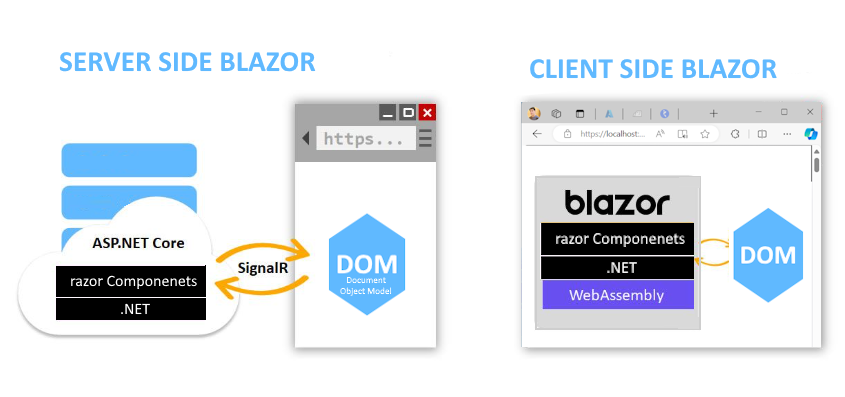
  Blazor Stack Overview Important Points: Blazor stack gives you options to create Web Applications without writing JavaScript (doesn't ...